
 |
 |
 |
 |
 |
What is SMART III?
SMART is a process that allows for the optimization and calibration of Home Theater Projectors using a low-cost “Do It Yourself” approach. A separate “Dummies Guide to SMART” introduces the principles behind the SMART process in layman’s terms.
SMART III is an advanced system for calibrating video projectors based
on a commercial light meter, make by AEMC, and allows accurate measurements
of light intensity over a wide range of light intensities - the dynamic
range of the meter is 2 million to 1. Needless to say, this allows accurate
measurement of contrast ratios for virtually any projector available today
and for the foreseeable future.
SMART III combines this accurate detector with carefully chosen RGB filters,
to allow the measurement of color intensity thus providing a basis for
measuring grayscale tracking or color balance as a function of IRE level.
Because of the excellent sensitivity to low light levels, it is possible
to use SMART III to measure color balance at the lowest IRE levels, including
IRE 0 or black. Accurate measurements of the color of "black"
are essential for tweaking the color of black either via user or service
menu controls, or with CC filters.
SMART III measures the intensity of the three primary colors using test
images and shows the results in several types of graphs. In particular,
SMART uses the Avia disc to display a series of images in which windows
appear in the center of the screen, against a black background, that represent
black and white and various shades of gray in linear steps of 10 IRE units.
(IRE is term use to represent the video input voltage level with black
represented by IRE 0, and white by IRE 100.) With each of these IRE windows,
SMART uses the light meter and colored filters to measure the light intensity
of each of the primary colors at each IRE level as shown below.

To understand why grayscale tracking is so important, click here.
Color balance and grayscale tracking are shown in two ways with SMART III. The Color balance chart shows color balance in terms of the intensity of all three colors as a function of IRE level. The data shown here is from a PLV-70 before service mode/CC filter tweaking.

Color balance and grayscale tracking are shown in two ways with SMART. The Color balance chart shows color balance in terms of the intensity of all three colors as a function of IRE level. The data shown here is from a PLV-70 before service mode/CC filter tweaking.
SMART III also estimates Color Temperature based on the RGB ratios. This
is done you will have an rough idea of what a say 10% difference in RGB
levels translates into in terms with which you may be more familiar, Color
Temperature.
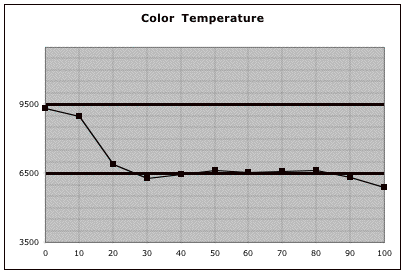
As can be seen in both diagrams, the PLV-70 measured here was deficient in red at the lowest IRE levels thus giving a blue-green tint to the darker regions of the picture. After service mode tweaking using SMART III and a CC filter, the following results were obtained.
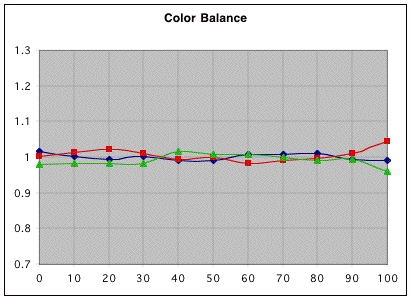
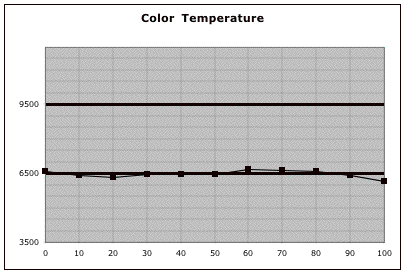
Needless to say, the overall improvements improvement in picture quality based after tweaking was considerable.
Because of the excellent dynamic range and sensitivity of the detector
to low light levels, it is possible to use SMART III to measure color
balance at the lowest IRE levels, including IRE 0 or black. Accurate measurements
of the color of "black" are essential for tweaking the color
of black either via user or service menu controls, or with CC filters.
Gamma tracking.
One of the other new and important features of SMART III is an accurate
measurement of the display's gamma and gamma tracking or its ability to
reproduce light levels accurately as a function of input or IRE level.
To understand more about gamma and gamma tracking, click here.
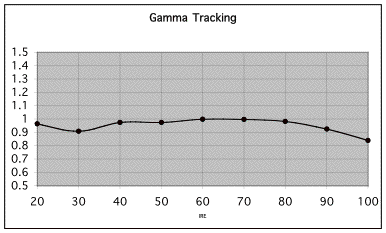
The PLV-70 shows very good after tweaking.
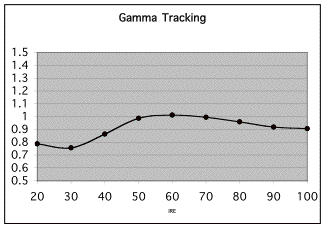
The gamma tracking above, however, illustrates that the Epson TW100 in its Theater mode has less light at low IRE levels relative to the ideal gamma response of the projector. Getting gamma tracking right is an important part of calibrating a video projector as it assures not only the right overall brightness to the image as well as good shadow details and whites that are not crushed.